Subscribe
Subscribe to the free USCCB liturgical calendar
Subscribing keeps your calendar updated. Next year's dates are added automatically.
Essential
Sundays, solemnities, feasts, and obligatory memorials. The most popular option.
Full
Everything in Essential plus all optional memorials from the USCCB calendar.
Download
Download a custom Catholic calendar file
Choose exactly what to include, then import into any calendar app.
Importing adds events to your calendar permanently. We recommend creating a new calendar (e.g., "Catholic Calendar") in your app first, then importing into that.
Downloads cover a single year. Come back next year to download again, or use a subscribe feed above to get new dates automatically.
Works with Google Calendar, Apple Calendar, Outlook, and any app that supports .ics files.
Auto-updates each year. Remove with one click. Choose from presets.
Fully customizable. One year at a time. To remove, delete the calendar you imported into.
Setup help
How to add the Catholic calendar to your phone
Google Calendar
On a computer, click the Google button above to add the Catholic calendar to your account in one step. It then shows up in Google Calendar on every device you sign in to.
On Android, webcal links can't subscribe on their own, so the button copies the feed URL and opens Google Calendar's Add by URL page:
- Tap the Google button. It copies the feed URL and opens the Add by URL page.
- Paste the URL into the "URL of calendar" field.
- Tap Add calendar.
Apple Calendar
On an iPhone or iPad, tap the Apple Calendar button above. Your device asks if you want to subscribe to the calendar, and you tap Subscribe to confirm.
On a Mac, the same button opens the Calendar app and shows the same prompt. Once it is added, the feast days appear in the Calendar app and stay up to date on their own.
Outlook
Click the Outlook button above. It opens Outlook on the web with the feed URL already filled in, and you confirm to add the calendar.
You can also add it by hand with the Copy link button:
- In Outlook on the web, open Add calendar, choose Subscribe from web, and paste the URL.
- In the Outlook desktop app, open Add Calendar, choose From Internet, and paste the URL.
Printable PDF
Free printable Catholic wall calendar PDF
Prefer a calendar on the wall? Download a free printable Catholic wall calendar PDF, twelve landscape pages with one month each, laid out as a classic wall-calendar grid. It uses the same USCCB calendar data as the feed above.
Every feast day, Sunday, liturgical color, and holy day of obligation is computed from the official USCCB calendar, the same data your parish uses. No static graphics, no outdated dates, and you can generate it for any year with no email and no signup.
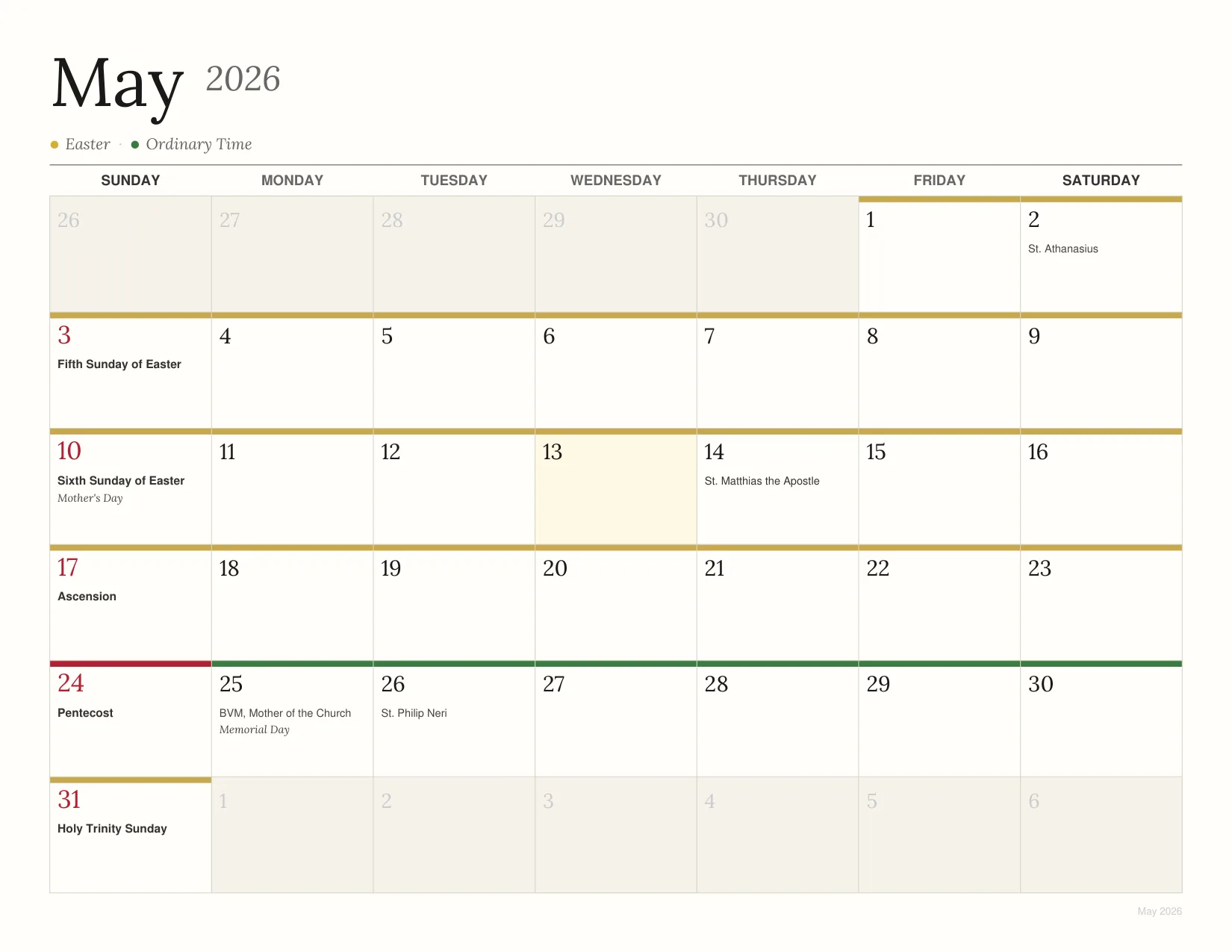
Generated from the official USCCB liturgical calendar.
Liturgical season colors
Each Sunday and feast day shows the proper liturgical color (violet, gold, green, red, rose, or white) as a color band on the day cell.
Every saint feast day
Solemnities, feasts, and memorials from the General Roman Calendar plus US proper saints, including all national feast days observed by the USCCB.
Holy days of obligation
Each holy day of obligation is shaded and clearly labeled, with the option to keep the Ascension on Thursday or move it to Sunday.
Print-ready landscape
Designed at 8.5x11 landscape for any home printer, with A4 and 11x17 tabloid sizes available for international or oversized wall display.
Build your calendar
Configure your Catholic calendar PDF
Set the year (2026, 2027, and beyond), paper size, and what to include, then download a print-ready PDF.
Print-ready PDF, generated instantly. First-time configurations may take up to 20 seconds.
After you download
How to print your Catholic wall calendar
Open in Adobe Reader
Open the PDF in Adobe Acrobat Reader for the most accurate print results. Avoid printing from your browser, which can resize the calendar.
Print at 100% / Actual Size
Select your paper size (Letter or A4), set orientation to landscape, and choose 100% / Actual Size. Heavier paper (24-32lb) gives the calendar a more substantial, wall-mounted feel.
Bind or hang each month
Three easy options: staple the stack at the top, hole-punch and use a calendar wire/ring binding, or simply tape each new month to the wall as the year progresses.
Follow the liturgical year
The seasons are visible at a glance: violet for Advent, gold for Christmas, green for Ordinary Time, purple for Lent, white for Easter. Every solemnity, feast, and memorial is in its place.
Coming up
Catholic feast days and holy days
Loading...
Catholic Holy Days of Obligation (United States)
Subscribe to the calendar above to see these in Google Calendar, Apple Calendar, or Outlook.
Want daily writing space? Build your free Catholic planner PDF. Reading on a tablet? Get the free digital planner for GoodNotes, Notability, or Xodo. All use the same USCCB calendar data.
For reference
Liturgical colors and the liturgical year
Liturgical colors
The Catholic Church marks each season of the liturgical year, and each feast, with a proper color. The calendar PDF shows these as a color band at the top of each day's cell.
The liturgical year at a glance
The Catholic liturgical year begins on the First Sunday of Advent, four Sundays before Christmas. It cycles through Advent (violet, preparation), Christmas (gold, joy), Ordinary Time (green, growth), Lent (violet, repentance), the Sacred Triduum (red, the Lord's Passion), and Easter (gold, resurrection). The 2025-2026 year uses Lectionary Year C, and the 2026-2027 year begins November 29, 2026 with Year A.
Some holy days shift from year to year. In some years the obligation for the Assumption, Mary Mother of God, or All Saints is suppressed when the feast falls on a Saturday or Monday, and the Ascension is transferred to Sunday in most US dioceses.
Which years are covered
The subscribe feeds stay current on their own, so 2026, 2027, and every year after arrive in your app without you doing anything. The downloadable .ics file and the printable PDF are built one year at a time, so you can generate the 2026 calendar now and come back for 2027 when you need it. Every year uses the same official USCCB liturgical calendar data.
Questions